
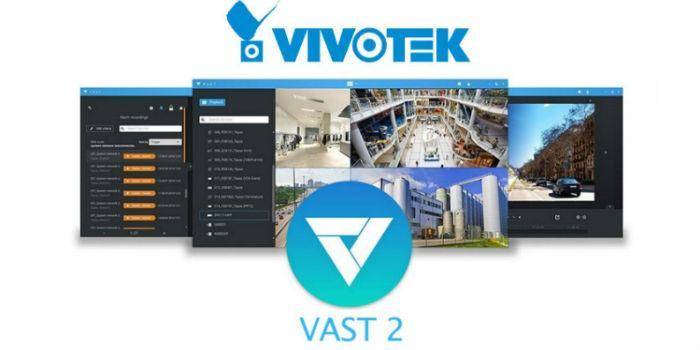
 International. Vivotek today unveiled the latest version of its VAST 2 video management software. Based on the powerful VAST software engine, VAST 2 offers a new intuitive user interface and features a wide range of user-friendly features, including automatic installation, advanced search, custom design, and other complementary protection, transport, and operation features in the event of failures. The new VAST 2 is designed for efficient video management, reducing operating and maintenance costs.
"Vivotek has conducted a number of alpha and beta tests prior to the release of VAST 2. We have collected feedback from our customers and have greatly improved usability and functionality to improve our users' experience with VAST 2. For VAST 2 we have designed a problem feedback mechanism, allowing the system to detect problems automatically and for security operators to send their feedback manually via a pop-up window. This feedback is delivered directly to Vivotek's team of application engineers, allowing us to accelerate customer service," said Chen Perkins, Director of Research and Development, Division 2, Vivotek Inc.
Thanks to automatic configuration wizards, VAST 2 simplifies the configuration of surveillance systems. Users can adjust the layout by simply dragging a corner of the window, a feature also supported by spherical correction for the Vivotek fisheye. With the addition of the evidence blocking feature, it is now easier to manage numerous investigation scenarios as it is possible to manually extend the retention time of recorded videos. These videos are easily exported with custom viewing arrangements. A quick capture feature is also incorporated to preserve critical evidence.
VAST 2 offers two types of search: smart search and thumbnail search. Both are designed to help security operators quickly filter out the scenarios of any suspicious scenes. Thanks to intelligent search, users can select the specific region of interest and the system will display a series of thumbnails representing motion detection shots. In addition to thumbnail search, this feature allows the user to navigate through time-based thumbnails. Security operators can streamline any investigation by quickly identifying thumbnails of interest.