
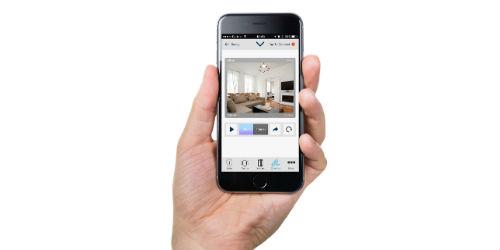
 Latin America. Tyco Security Products introduces the latest version of VisonicGO, the mobile app that displays images of events as they are happening for customers to make event-related security decisions from an Android or iOS tablet or smartphone. The app can be used for self-monitoring and to complement monitoring services.
By using cloud servers, residential and commercial users with PowerMaster dashboards can connect to the VisonicGO app and execute key security system functions: arm and disarm systems, manage event history remotely, and receive information about the status of a device, such as a door or window that was left open, and take appropriate action. In addition, users can customize event notifications to receive only the information they are interested in and avoid data overload.
VisonicGO allows you to obtain images and notifications of sound or text in real time from alarms. As the visual verification feature is available upon request, users can make decisions based on what is happening, as if they were in the scene. Archived footage can be sent to law enforcement agencies to identify suspects or to insurance companies to document incidents. Event images and alarm information can be shared with the user and the monitoring company at the same time to provide peace of mind during an ongoing event, provide vital real-time data, and eliminate unnecessary expenses for false alarms.
"One of the main requests customers place with their installers is the ability to monitor events remotely so they can be present when something happens, even if they're away from home or business," says Hernán Herrera, Product Marketing Manager for Intrusion at Tyco Security Products. "The VisonicGO app puts information in the hands of the end user, whether it's the homeowner who wants to monitor their residence via their mobile while on vacation or a business customer who wants to monitor and respond to events at all times."
The VisonicGO app is available in 15 languages and can be downloaded from the App Store and Google Play. For more information about VisonicGO, visit www.visonic.com